Stop typing.
Start talking. — Voice dictation and meeting recorder for Windows.

Voice dictation and meeting transcription for Windows. Push a key, speak, release — the text lands at your cursor. Record any meeting and a clean AI summary is one click away.

14-day free trial · no credit card

Record any meeting, no bot needed

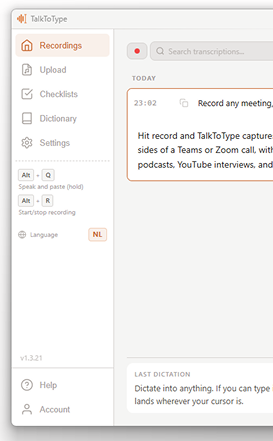
Hit record and TalkToType captures both your microphone and the audio from your speakers — both sides of a Teams or Zoom call, without an awkward "bot has joined" notification. Same trick works for podcasts, YouTube interviews, and the dictaphone-on-the-table moment you forgot to plan for.

Recording happens on your own computer, like any local recording app. You're responsible for telling participants you're recording where local law requires it (the EU does, most US states do).

Dictate into anything

If you can type into it, you can talk into it. Hold a key, speak, release, and the text lands wherever your cursor is — your inbox, ChatGPT, Slack, the search bar of your browser.

Your best work doesn't happen while you type.
It happens when you work out what you actually want to say.

In that moment the thought is whole. Every bit of nuance, exactly as you mean it. That's you at your sharpest. Then it has to come out, letter by letter, and your fingers can't keep up. So you cut along the way. The nuance goes. The explanation gets shorter. And what's left isn't what you had in your head. Not because you had less to say. Because the easy path is a smaller thought. So the world keeps getting a watered-down version of what you thought. When the better version already existed. It doesn't have to.

Just talk.

Nothing left to cut. What you write matches what you thought again. You give the whole thought instead of the summary. And with AI that's the difference between a decent answer and the right one: the more complete the context, the better the output.

That's what TalkToType is for. Not to make you type faster.
To stop you settling for less than you had to say.

Built for people whose job is mostly talking

Vibe coders

Speaking is faster than typing, so you hand your AI the full picture instead of a few keywords. Describe the real problem out loud, edge cases and all, holding a key while your words land straight in Cursor, Copilot or ChatGPT. Sharper input, sharper output.

Recruiters

Keep your attention on the candidate instead of on your notes. The intake is recorded and transcribed while you talk, so nothing a candidate said gets lost. Weeks later you search your calls and find exactly who mentioned what.

Sales

Capture every discovery call without a bot rolling into the meeting. No awkward "bot has joined" in front of your prospect, just a clean recording for yourself. Pull out the needs afterwards, ready to paste into your CRM.

Managers

Lead the conversation instead of writing it down. The moment it ends, the summary and action items land in your inbox automatically. You assign follow-ups with confidence, not from whatever you can vaguely recall.

Consultants

Every client requirement captured the moment it's said. The premium transcript upgrade gives you a top-quality, word-for-word transcript, clean enough to drop straight into your report. You leave with substance, not a half-page of cryptic shorthand.

Researchers & journalists

Your recordings already exist: interviews, field conversations, old archive material. Upload the audio file and get a searchable transcript back. No more spending an afternoon scrubbing to find that one quote.

What it actually does

The TalkToType app showing the recordings list and sidebar

Dictate into anything

Hold a key, speak, release. The text appears wherever your cursor is, in any app: Outlook, Slack, Word, Teams chat, the search bar of your browser. The under-appreciated bonus: people give way better prompts to ChatGPT when they speak than when they type. You'll find yourself explaining the actual problem instead of stripping it down to seven keywords.

Record a meeting, no bot needed

TalkToType grabs both your microphone and the audio coming from your speakers. So both sides of a Teams or Zoom call land in the same recording, without an awkward "bot has joined" notification. Same trick for Google Meet, Webex, any platform, even YouTube. The transcript scrolls live as the conversation happens, in 30-second chunks. When you stop you have an MP3 and a clean text file.

Eleven languages, one hotkey

Dictating to a Dutch colleague, then a French client? Set your two languages and tap one key to flip your output between them — the next dictation comes out in the language you need. Eleven languages to choose from, and speaking straight into English works from your own language too. Add tricky names or jargon to your personal dictionary and the AI will spell them right every time.

Got old recordings? Drop them in.

That folder of voice memos, interview WAVs, meeting MP3s you keep meaning to listen back to? Drag them into TalkToType and you get the same transcript and AI summary as a live recording. Catching up on a missed meeting takes minutes instead of an afternoon.

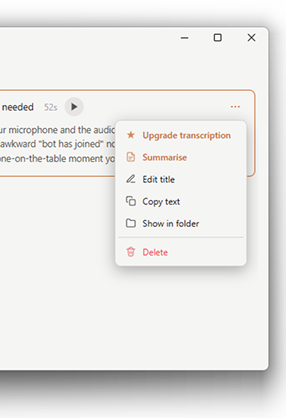
TalkToType's menu with the Upgrade transcription option

Upgrade transcription with Gemini

Live transcription is fast and good enough for most calls. For the meeting you actually need to keep clean, click "Upgrade transcript" and a heavier AI model goes back over the audio. Handles accents, technical jargon and overlapping speakers far better, and adds speaker labels plus timestamps so you can search back to a specific moment. You decide which recordings deserve it. No need to pay for all of them.

No bots. No "X has joined the call".

Most meeting transcribers send their own bot into your call. Useful on paper, annoying in practice. TalkToType records from your own computer — no bot, no extra participant in the meeting.

Meeting bots (Otter, Fireflies, ...) TalkToType
Visible as a bot in the call? Yes -- "Bot joined" notification No -- no bot, no extra participant
Where do your recordings live? On their servers, forever On your computer only
Works with every platform? Only supported apps Any app that plays audio
Recurring cost? $16-30/month From €49 one-time

You switch languages all day? It keeps up.

Set a primary and a secondary language, then flip your output between them with one tap on F8 — each dictation lands in the one you need. Speak any of eleven languages and it types them straight back; speak Dutch and watch it come out in English without touching the keyboard. No settings to dig through, no menus.

The small stuff that adds up

Tiny details, but the ones you'd miss if they weren't there.

Re-paste your last dictation

Closed the wrong window or pasted in the wrong field? Win + Esc drops the same text again, wherever your cursor is now.

Pause recordings and resume

Need a break mid-recording? Pause it, step away, and hit resume when you're back. It all lands in one clean recording — no gaps to stitch together afterwards.

Pick your own hotkeys

Don't like the defaults? Remap any shortcut. The app won't hijack the keys you already use for something else.

Three minutes from install to first transcript

No setup screen marathon. No API keys to figure out. Download, click, talk.

Install

A small installer that takes under a minute.

Open it

Pick your language and you're in. Your 14-day trial starts automatically.

Talk

Press Alt+Q and your words land at your cursor. Hit record for a live meeting transcript.

It's yours

Every recording becomes an MP3 plus a clean text file, right on your own computer.

We don't keep your recordings. Anywhere.

Your audio files live on your own computer and stay there. We don't back them up, we don't analyse them, and there's no server of ours for them to land on. There isn't even a TalkToType account you sign up for — we literally have nowhere to put your stuff.

For transcription, your audio goes straight from your computer to the speech-to-text provider, not through us. Your device grabs a key from us and sends the sound there directly, so we're never in the middle and can't read it. The provider doesn't train on your audio and doesn't keep it beyond the transcription.

Want to decide for yourself who processes your audio? With the Lifetime License you bring your own key. You pick the provider, and your device sends the sound straight there — we're out of the picture entirely.

Pricing

Feature
Free
€0
forever
Starter
€9.95
per month
Most complete
Pro
€25
per month
License
€49
one-time
Bring your own AI key. Pay once.
Inline Dictation 2,000 words/week Unlimited Unlimited Unlimited
Record & transcribe meetings — ✓ ✓ ✓
Upload audio files — ✓ ✓ ✓
AI summary — ✓ ✓ ✓
Email summary delivery — — ✓ ✓
Premium transcript upgrade — ✓ 100 min/mo ✓ 1200 min/mo your own Gemini key
Premium AI summary — — ✓ your own Gemini key
Use your own Groq / OpenAI / Google account — — — ✓
Lifetime, no subscription — — — ✓
Free €0 forever
  • Inline dictation — 2,000 words/week
Starter €9.95 /mo
  • Unlimited inline dictation
  • Record & transcribe meetings
  • Upload audio files
  • AI summary
  • Premium transcript upgrade (100 min/mo)
Most complete
Pro €25 /mo
  • Everything in Starter, plus:
  • Email summary delivery
  • Premium transcript upgrade (1200 min/mo)
  • Premium AI summary
License €49 once

Bring your own AI key. Pay once.

  • All features, on your own key:
  • Use your own Groq / OpenAI / Google account
  • Transcript upgrade and premium summary: your own Gemini key
  • Lifetime, no subscription

Every plan starts with a 14-day free trial — every feature included, no credit card needed. You only pick a plan if you decide to keep going.

Frequently asked questions

Is my audio private?

Yes. Your audio files live on your own computer and stay there. We don't back them up and we have no server for them to land on — there isn't even an account you sign up for.

For transcription, your audio goes straight from your computer to the speech-to-text provider, not through us. Your device grabs a key from us and sends the sound on directly, so we can't read it. The provider doesn't train on your audio and doesn't keep it beyond the transcription.

With the Lifetime License you bring your own key. Then you choose which provider processes your audio.

Can I try before I buy?

Yes, 14 days, every feature included, no card needed. Download, install, click start. The clock only starts when you launch the app for the first time.

What's the difference between the plans?

Lifetime License (€49 one-time): pay once, no monthly fee. You make a free Groq account (one minute), paste the key into the app, done (step by step). Groq is free for normal use so most people never pay them anything either. Power users can swap Groq for OpenAI or Google.

Starter (€9.95/mo): everything managed, no accounts to set up. Unlimited live transcription, dictation, summaries, and meeting recording. Includes 100 minutes of premium transcript upgrades a month.

Pro (€25/mo): for heavy users and small teams. 1200 premium minutes a month, plus priority support.

All paid plans start with a 14-day free trial.

What is TalkToType actually?

A desktop app for Windows that does two things really well. One: you hold a key, speak, and the text shows up wherever your cursor is. Two: you press record before a meeting and afterwards you have a transcript and an AI summary.

How does dictation work in practice?

Hold the hotkey, speak, release. The text appears at your cursor. Doesn't matter if you're in Outlook, ChatGPT, Slack, a Word document or the search bar of your browser. If you can type into it, you can talk into it.

Does it work with Teams, Zoom, Google Meet?

Yes, and any other platform too. TalkToType isn't a bot that joins your call. It records what comes out of your speakers and what goes into your microphone, on your own machine. So you get both sides of the conversation, no one sees a "bot has joined" notification, and you don't have to give some third-party company access to your meetings.

Which languages does it handle?

You can dictate in eleven languages — speak one and it types it back in that same language. Set a primary and a secondary language and tap F8 to flip your output between them. Speaking your own language straight into English works too.

What is a "premium transcript" and when do I need one?

Live transcription runs while you record, using a fast model. It's accurate enough for almost everything you'll do day-to-day.

For the recordings that really matter (important meetings, interviews, calls with heavy accents or jargon) you can click "Upgrade transcript" and a heavier AI model goes back over the audio. It handles long multi-speaker recordings better, sorts out who said what, and catches the bits the faster model misses.

Starter includes 100 minutes of premium upgrades a month, Pro 1200. On those plans the upgrade starts by itself after every recording of a minute or longer. On a Lifetime License the "Upgrade transcript" button runs on your own Google AI key. Live transcription and dictation are unlimited on every paid plan.

Can I drop in an old recording?

Yes. Drag any MP3, WAV, M4A or OGG into the app and you get the same transcript and AI summary as a live recording. Useful for that pile of voice memos you keep meaning to listen back to, or for catching up on a meeting you missed.

Why is speaking to ChatGPT better than typing?

When you talk you give context. When you type you cut corners. People who dictate their prompts naturally explain what they actually need ("I'm writing a follow-up email to a client who didn't reply, here's the original thread, keep it warm but firm") instead of stripping it to keywords ("follow up email firm but polite"). The AI gives you better answers because you gave it a better question. And it took less time to ask.

Stop scribbling. Start listening.

Fourteen days free, no card needed. If it doesn't save you time, just close the app and move on.

14-day free trial · no credit card · automatic updates